Quick fixes for the most common issues with the RideBLink app and bike locks.
1
Cannot unlock the lock
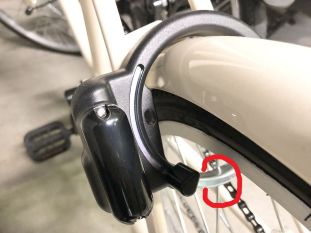
Check that the wheel spoke is not touching the lock ring — it may prevent unlocking.
Make sure it is your bike: check that the Bike ID on the QR code matches the Bike ID shown in the app.
Make sure both Bluetooth and location are turned on.
If none of the above works, close the app and try again.
If the wheel spoke is touching the lock ring (circled), the lock will not open.
2
Cannot lock the lock
First, tap "Unlock" in the app — you should hear the lock motor rotate.
Repeat this 2–3 times. After that, you should be able to lock the lock.
3
Want to rent a bike but the lock won't open
Open the menu and go to "Requirement check". Confirm that Bluetooth (nearby device) and location permissions are granted. If not, tap "Open settings" and grant them.
Also make sure Bluetooth and location are turned on at the system level.
4
The loading spinner keeps spinning
Close the app fully, then open it again. The spinner should disappear.
How to close: swipe up slowly from the bottom of the screen — the app card will shrink to the middle. Swipe it up again to dismiss it. On some Android devices, tap the three-line navigation button to bring up recent apps, then swipe the card up.
5
The "Unlock" button disappeared
The unlock screen may be minimized. Look for "Tap here to show the unlock and end ride buttons" at the bottom of the screen and tap it.
You may also have logged out by mistake. Sign in again from the menu.
6
When ending a ride, the app says the lock is not locked
Manually lock the lock and tap "Retry scan". If the message still appears, tap "Force end ride" at the bottom of the popup to finish the ride.
7
When ending a ride, the app says "Bike is not at a port"
You can only end a ride at designated returning locations (ports). For a temporary stop, just lock the bike manually.
If you are at the correct port, tap "Force end ride" at the bottom right to finish.
8
Can I unlock the lock without an internet connection?
Yes. Once you start a rental, the rental information is stored on your device, so you can unlock the bike afterwards even without internet.
9
I can't find the app on the App Store / Google Play
Search for "rideblink bike sharing" — that should show it.
Still need help?
If your issue is not covered above, please get in touch and we will help you out.